Running a Local LLM on Kubernetes — A Home Lab Setup

In Part 1 I ran Ollama directly on a Linux machine and wired it up through an MCP layer to a small web app. It worked. But bare-metal has friction — if the process crashes, it stays down. Adding Open-WebUI means managing another process. Resource limits are manual. There's no clean internal networking between services.
This post moves the whole thing into Kubernetes. The goal isn't enterprise-grade infrastructure — it's a home lab setup that's reliable, easy to extend, and honest about its limitations.
Manifests are in the ollama-mcp-starter repo under backend/k8s-deployment/.
The Hardware
The server is an Intel NUC Hades Canyon (NUC8i7HVK) — a small-form-factor machine with a skull logo on the lid and a surprisingly capable spec for its size:
| Component | Detail |
|---|---|
| CPU | Intel Core i7-8809G, 4C/8T, 3.1 GHz base / 4.2 GHz turbo |
| RAM | 32 GB DDR4 |
| Storage | NVMe SSD (M.2 PCIe) |
| GPU | AMD Radeon RX Vega M GH — 4 GB HBM2 |
| Network | 2× Intel Gigabit LAN |
| Power | 230W external adapter |
It draws modest power for a home server, runs quietly, and fits on a shelf. These are the things that matter when it's on 24/7.
The GPU caveat
The Vega M GH is a capable GPU for graphics workloads, but Ollama's GPU acceleration uses CUDA — an NVIDIA-only technology. AMD GPU support via ROCm exists in Ollama but requires manual configuration and is not supported through the standard Kubernetes GPU operator.
In practice: Ollama on this box runs CPU-only. The i7-8809G handles inference well enough for personal and home lab use — expect 10–20 tokens/second with llama3.1:8b. More on this in Lessons Learned.
Why Move to Kubernetes?
Running Ollama on bare metal works, but once you add a second service (Open-WebUI), you're managing two processes manually. A third service and it becomes unwieldy. Kubernetes solves this cleanly:
- Auto-restart — pods restart automatically on crash; no babysitting processes
- Resource limits — cap CPU and memory per service so one greedy process can't starve the others
- Persistent storage — PersistentVolumeClaims keep model data across pod restarts
- Internal DNS — services talk to each other by name (
ollama-service.ollama.svc.cluster.local) rather than fragile IP addresses - Ingress — one load balancer IP, hostname-based routing to multiple services
For a single-node home lab, MicroK8s is the right choice. It installs as a snap package, ships with the add-ons you need, and doesn't require a multi-node cluster to be useful.
Architecture Overview
Before diving into setup, here's the logical view of the full system:
Two access paths to Ollama:
- MCP path (from Part 1) — Browser → Static Frontend → Node.js Backend → MCP Server →
ollama.local - Direct path — Browser →
ai.local→ Open-WebUI → Ollama (internal ClusterIP)
Both paths go through MetalLB and Nginx on the NUC. The MCP app and frontend still run on the dev machine; only the inference layer lives in Kubernetes.
MicroK8s Setup
Install
sudo snap install microk8s --classic
sudo usermod -aG microk8s $USER
newgrp microk8s
Verify the node is ready:
microk8s kubectl get nodes
Enable Add-ons
microk8s enable dns
microk8s enable storage
microk8s enable ingress
microk8s enable metallb
When enabling MetalLB, you'll be prompted for an IP range. Use a small slice of your local subnet that won't conflict with DHCP — for example:
192.168.1.50-192.168.1.60
MetalLB will assign IPs from this pool to LoadBalancer services. The ingress controller picks up 192.168.1.54 in this setup.
kubectl alias
MicroK8s ships its own kubectl. To use the standard kubectl command (useful for remote access from another machine):
microk8s config > ~/.kube/config
Then install kubectl on your client machine and point it at the exported config.
GPU Operator
microk8s enable gpu
This installs the NVIDIA GPU Operator. It works well if your node has an NVIDIA card — it handles driver installation, container runtime configuration, and makes GPUs schedulable as resources.
On this NUC, the GPU is AMD (Vega M GH), so the operator deploys but has nothing to drive. Ollama falls back to CPU. The gpu-operator-resources namespace will exist but be idle. See Lessons Learned.
Deploying Ollama
Why a StatefulSet?
Ollama stores pulled models in /root/.ollama. A Deployment gives pods random names and doesn't guarantee stable storage attachment. A StatefulSet gives a stable pod name (ollama-0), ordered startup and shutdown, and a consistent binding between the pod and its PersistentVolumeClaim.
The Stack Manifest
ollama-stack.yaml creates four resources in sequence:
- The
ollamanamespace - A 50 Gi PVC (models are large —
llama3.1:8bis ~5 GB; headroom matters) - The Ollama StatefulSet
- A ClusterIP service on port 11434
apiVersion: apps/v1
kind: StatefulSet
metadata:
  name: ollama
  namespace: ollama
spec:
  replicas: 1
  template:
    spec:
      containers:
        - name: ollama
          image: ollama/ollama:latest
          resources:
            limits:
              cpu: "4"
              memory: "16Gi"
            requests:
              cpu: "2"
              memory: "4Gi"
          volumeMounts:
            - name: ollama-volume
              mountPath: /root/.ollama
The memory limit of 16 Gi gives llama3.1:8b enough headroom to load the full model into RAM without competing with Open-WebUI for the remaining 16 Gi.
Model Preload with initContainer
The first time Ollama starts, no models are pulled. If your app tries to chat before a model exists, it fails with a confusing error. ollama-automated.yaml solves this with an initContainer that pulls the model before the main container starts:
initContainers:
  - name: pull-model
    image: ollama/ollama:latest
    command: ["/bin/sh", "-c"]
    args:
      - |
        ollama serve &
        sleep 5
        ollama pull llama3.1:8b
        kill %1
    volumeMounts:
      - name: ollama-volume
        mountPath: /root/.ollama
The init container starts ollama serve in the background, waits for it to be ready, pulls the model, then stops. The main container finds the model already on disk and starts serving immediately.
Apply it:
kubectl apply -f backend/k8s-deployment/ollama-stack.yaml
# or, to pre-pull the model on first boot:
kubectl apply -f backend/k8s-deployment/ollama-automated.yaml
Deploying Open-WebUI
Open-WebUI is a polished chat interface that connects directly to Ollama. open-webui-stack.yaml deploys it in the same ollama namespace:
env:
  - name: OLLAMA_BASE_URL
    value: http://ollama-service.ollama.svc.cluster.local:11434
The key line is OLLAMA_BASE_URL. It uses Kubernetes internal DNS (<service>.<namespace>.svc.cluster.local) to reach Ollama — no hard-coded IPs, no reliance on external networking. If the Ollama pod restarts and gets a new IP, the DNS name still resolves correctly.
A 10 Gi PVC stores chat history and Open-WebUI configuration.
kubectl apply -f backend/k8s-deployment/open-webui-stack.yaml
Once running, Open-WebUI is available at http://ai.local (after ingress is configured below).
MetalLB + Nginx Ingress
Why MetalLB?
In a cloud cluster, type: LoadBalancer services get a public IP automatically from the cloud provider. On bare metal, nothing assigns that IP — services stay in <pending>. MetalLB fills that gap by assigning IPs from a configured pool to LoadBalancer services on your local network.
ingress-lb.yaml creates a LoadBalancer service for the Nginx ingress controller:
kubectl apply -f backend/k8s-deployment/ingress-lb.yaml
MetalLB assigns 192.168.1.54 from the configured pool. Verify:
kubectl get svc -n ingress
# ingress-loadbalancer   LoadBalancer   ...   192.168.1.54   80:...,443:...
Ingress Rules
Three ingress objects route hostnames to services:
| File | Hostname | Target Service |
|---|---|---|
ollama-ingress.yaml | ollama.local | ollama-service:11434 |
open-webui-ingress.yaml | ai.local | open-webui-service:80 |
dashboard-ingress.yaml | dashboard.local | Kubernetes dashboard |
kubectl apply -f backend/k8s-deployment/ollama-ingress.yaml
kubectl apply -f backend/k8s-deployment/open-webui-ingress.yaml
kubectl apply -f backend/k8s-deployment/dashboard-ingress.yaml
Client Hosts File
Any machine that wants to reach these hostnames needs a single /etc/hosts entry pointing the names at the MetalLB IP:
192.168.1.54 dashboard.local ollama.local ai.local
On macOS: /etc/hosts. On Windows: C:\Windows\System32\drivers\etc\hosts.
After this, http://ai.local opens Open-WebUI in the browser, and http://ollama.local is the Ollama API endpoint.
Connecting the MCP App from Part 1
The MCP app from Part 1 pointed at the bare-metal Ollama IP. Switching to the k8s deployment is a one-line .env change in both backend/.env and mcp-server/.env:
# Before (bare metal)
OLLAMA_HOST=http://192.168.1.80:11434

# After (k8s ingress)
OLLAMA_HOST=http://ollama.local
OLLAMA_MODEL=llama3.1:8b
OLLAMA_TIMEOUT=180000
The app now survives an Ollama pod restart without any manual intervention — the pod comes back up, the DNS name resolves, and the next request succeeds. The 3-minute timeout (180000 ms) accounts for the slower CPU-only inference on llama3.1:8b.
Verifying the Deployment
Check everything is running:
kubectl get pods,svc,ingress -n ollama
Expected output:
NAME                             READY   STATUS    RESTARTS
pod/ollama-0                     1/1     Running   1
pod/open-webui-648d966b5-jsvfl   1/1     Running   2

NAME                         TYPE        CLUSTER-IP       PORT(S)
service/ollama-service       ClusterIP   10.152.183.132   11434/TCP
service/open-webui-service   ClusterIP   10.152.183.48    80/TCP

NAME                                    HOSTS        ADDRESS
ingress/ollama-ingress                  ollama.local 127.0.0.1
ingress/open-webui-ingress             ai.local     127.0.0.1
Test Ollama directly:
curl http://ollama.local/api/tags
Demo
With everything running, Open-WebUI is available at http://ai.local — a full chat interface served entirely from the home lab, with no cloud API involved.
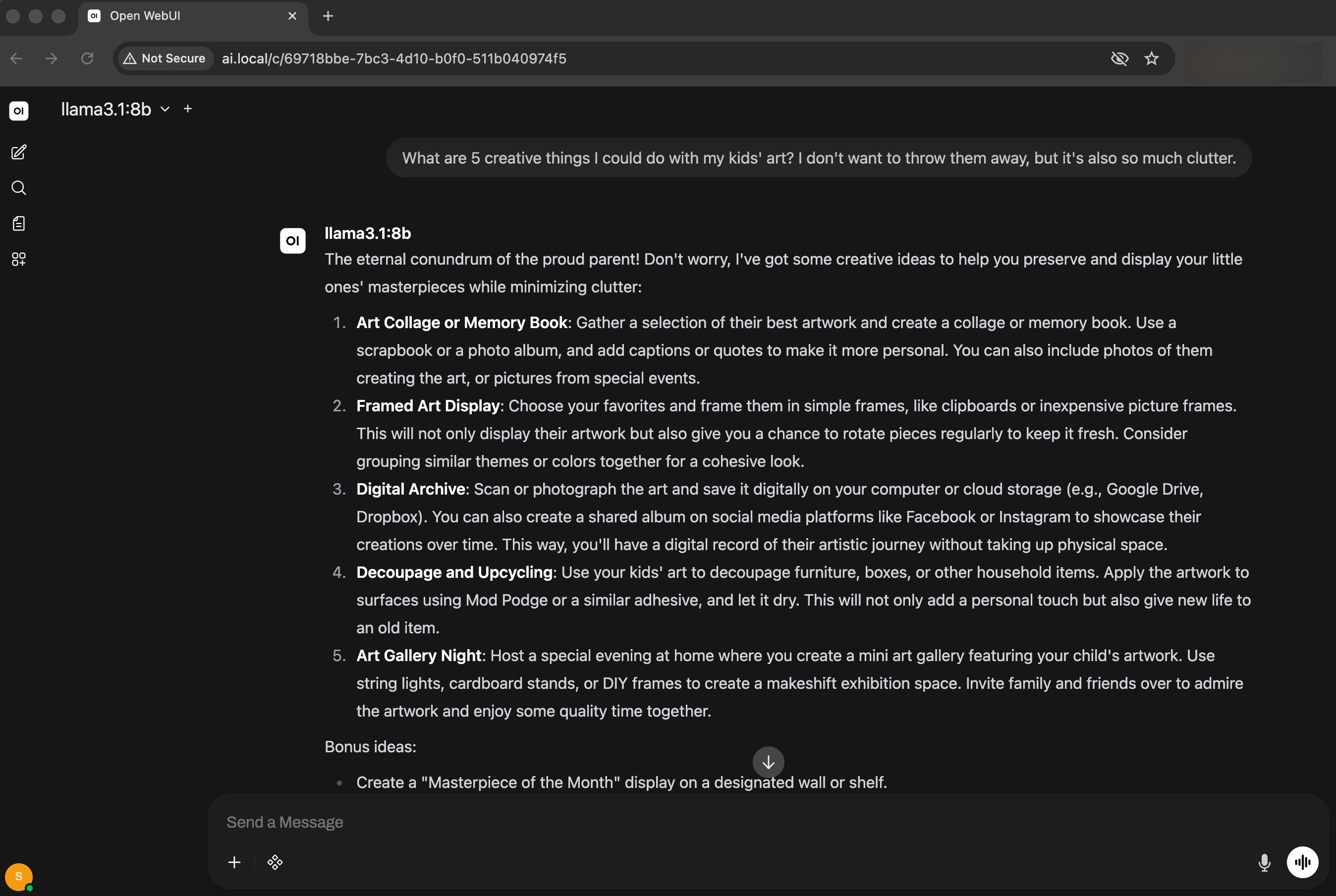
llama3.1:8b handling a practical question with a detailed, well-structured response. The model name and URL in the browser confirm it's running locally through the k8s ingress.
Lessons Learned
The GPU assumption cost time. I installed the NVIDIA GPU operator early, assumed Ollama would detect the AMD Vega M and use it. It didn't — CUDA and ROCm are separate stacks. The Ollama container never saw the GPU. Lesson: check GPU vendor before planning acceleration. For AMD, ROCm support in Ollama requires a custom image and a different operator setup — a future post if I get there.
CPU inference is slower than expected on larger models. llama3.2:3b from Part 1 was snappy on CPU. Upgrading to llama3.1:8b dropped throughput noticeably — around 10–15 tokens/second. The 3B model was fine for quick tests; the 8B model is better quality but requires patience. The 3-minute timeout in the MCP app exists because of this.
The initContainer preload is worth the complexity. On first deploy without it, the Ollama pod starts, the Open-WebUI pod starts, a user immediately tries to chat, and gets a confusing "model not found" error. The initContainer adds maybe 5 minutes to first boot (model download) and eliminates that failure mode entirely.
StatefulSet vs Deployment matters less than the PVC. I spent time deliberating over this. The real thing that matters is the PVC binding — models must persist across restarts. StatefulSet makes the PVC binding explicit; a Deployment with a manual PVC binding would also work. StatefulSet is cleaner.
Ingress address shows 127.0.0.1 — that's normal. MicroK8s reports the ingress ADDRESS as 127.0.0.1 rather than the MetalLB IP. This confused me initially. The actual external IP lives on the LoadBalancer service in the ingress namespace, not on the ingress objects themselves.
What's Next
The infrastructure is stable. The next steps are on the application side:
- Streaming responses — the MCP app waits for the full model completion before showing anything; streaming would feel much more interactive
- Containerise the app — the Node.js backend and MCP server still run locally on the dev machine; packaging them as containers and deploying to the same cluster would make the whole system self-contained
- AMD GPU support — ROCm-based Ollama on the Vega M is worth exploring; a 4 GB HBM2 GPU could significantly improve throughput even at reduced model precision
The full source, including all manifests, is on GitHub. Feedback and contributions welcome.