Running a Local LLM with Ollama and MCP — An Architecture Spike

AI inference doesn't have to mean a cloud API call. This post walks through a spike I built to run a locally hosted language model through a clean, layered architecture using Ollama and the Model Context Protocol (MCP).
The full source is on GitHub. Contributions and feedback welcome.
Why Local LLMs?
Most AI integrations today rely on external APIs — you send a prompt to a cloud provider, they run the model, you get a response. That works fine for many use cases, but it comes with real tradeoffs:
- Privacy: your prompts leave your network
- Connectivity: requires reliable internet
- Cost: token-based pricing adds up quickly at scale
- Latency: round-trip to a remote data centre
For health tech, crisis response, and humanitarian tools — areas where JigsawFlux focuses — these tradeoffs can matter a great deal. Patient data is sensitive. Field teams in disaster zones may have limited connectivity. Running AI locally sidesteps all of these concerns.
Local LLMs have become genuinely useful. Models like llama3.2:3b run comfortably on consumer hardware and handle a wide range of practical tasks: summarisation, triage, Q&A, and structured extraction.
What is Ollama?
Ollama is an open-source tool that makes running LLMs locally straightforward. Think of it as a package manager for AI models — pull a model, run it, and interact with it over a local HTTP API.
ollama pull llama3.2:3b
ollama run llama3.2:3b
Once running, Ollama exposes a REST API on localhost:11434 (or a networked host). It handles model loading, memory management, and inference. You interact with it exactly as you would a cloud API, just without the round-trip.
For this spike, Ollama runs on a separate machine on my local network at 192.168.1.80 — a common setup where a more capable machine hosts the model and lighter clients query it.
Setting Up Ollama on Linux
Installation
The quickest way is the official install script — one line and it handles everything:
curl -fsSL https://ollama.com/install.sh | sh
If you prefer to install manually (air-gapped environments, or you want control over the binary location):
# Download the Linux binary
curl -L https://ollama.com/download/ollama-linux-amd64 -o ollama

# Make it executable
chmod +x ollama

# Move to a directory in your PATH
sudo mv ollama /usr/local/bin/
Starting the Server
By default, ollama serve binds to 127.0.0.1 — only accessible from the same machine. For this spike, Ollama runs on a dedicated machine on the local network and the application connects to it from a different host. To allow that, bind to all interfaces:
OLLAMA_HOST=0.0.0.0 ollama serve
To make this permanent (e.g. as a systemd service override):
sudo systemctl edit ollama.service
Add the following and save:
[Service]
Environment="OLLAMA_HOST=0.0.0.0"
Then reload and restart:
sudo systemctl daemon-reload
sudo systemctl restart ollama
The server now listens on port 11434 on all network interfaces. Other machines on the same network can reach it at http://<host-ip>:11434.
Pulling a Model
Before the server can handle requests, pull the model you want to use:
ollama pull llama3.2:3b
Testing the API
Ollama exposes a simple HTTP API. Once the server is running, you can test it directly with curl — no SDK needed.
Generate completion (single prompt, no conversation context):
curl $OLLAMA_HOST/api/generate -d '{
  "model": "llama3.2",
  "prompt": "Explain kubernetes in one paragraph",
  "stream": false
}'
Chat completion (conversation format with message roles):
curl $OLLAMA_HOST/api/chat -d '{
  "model": "llama3.2",
  "messages": [
    {"role": "user", "content": "What is Docker?"}
  ],
  "stream": false
}'
The /api/generate endpoint is stateless — one prompt in, one response out. The /api/chat endpoint accepts a messages array so you can pass conversation history and get contextually aware replies. This spike uses /api/chat for both the chat and summarise tools.
Set OLLAMA_HOST in your environment or .env file to point at the machine running Ollama:
OLLAMA_HOST=http://192.168.1.80:11434
What is MCP?
The Model Context Protocol (MCP) is an open standard from Anthropic for structuring communication between AI hosts and the tools or services they call. It defines a consistent way to:
- Expose tools — name them, describe their inputs/outputs
- Call tools — invoke them with structured arguments
- Handle responses — receive results in a predictable format
The key idea is separation of concerns. Your application logic doesn't need to know the details of how a model is invoked — it just calls a tool. The MCP server handles the translation to whatever inference backend is running.
This makes the architecture composable. Swap Ollama for another model runner, add a new tool, or connect a different MCP client — each layer stays isolated.
Architecture of the Spike
The system has four main layers:
Layer 1: Browser (Frontend)
A vanilla HTML/CSS/JS frontend with two tabs — Chat and Summarise. No framework, no build step. The UI handles user input, loading states, and error display. It talks only to the Express backend and never directly to Ollama.
Layer 2: Express Backend (API Layer)
A Node.js/Express server that exposes three endpoints:
| Endpoint | Description |
|---|---|
GET /health | Returns status of backend, MCP, and Ollama |
POST /chat | Accepts a prompt, returns a model response |
POST /summarise | Accepts text and optional style, returns a summary |
The backend holds a persistent MCP client session — one long-lived connection to the MCP server rather than spinning up a new process per request. It also assigns a correlation ID to each request for tracing.
Layer 3: MCP Server (Tool Layer)
A stdio-based MCP server written in TypeScript. It registers three tools:
health_check— pings Ollama and returns statuschat— sends a prompt to the modelsummarise— sends a text block for summarisation
The MCP server contains an Ollama adapter — a single module that centralises all Ollama API communication. Connection errors, timeouts, and model-not-found responses are normalised here into consistent, user-actionable messages.
Layer 4: Ollama (Inference Layer)
The model runner. This spike uses llama3.2:3b — a capable 3-billion parameter model that runs fast on modest hardware. Ollama receives requests at /api/chat and returns model completions.
Request Flow
Here is what happens when you submit a prompt in the chat UI:
The response includes the model name and duration — useful for understanding latency and knowing which model answered.
Key Design Decisions
Isolated Ollama adapter. All HTTP calls to Ollama live in one file (ollama-adapter.ts). Changing the inference backend, adding retry logic, or switching models only requires touching this one module.
Stdio MCP transport. The MCP server runs as a child process communicating over stdio rather than a network socket. This keeps deployment simple — no extra port to manage — and makes it easy to integrate with other MCP-compatible clients like VS Code Copilot.
Single persistent MCP session. The backend creates one MCP client session at startup and reuses it across requests. This avoids the overhead of spawning a new process per request and keeps session state coherent.
Vanilla frontend. No React, no Vite, no build pipeline. The frontend is plain HTML/CSS/JS served directly. This keeps the system portable — it can run anywhere a static file server exists.
Security baseline. The browser never talks to Ollama directly. All inference is proxied through the backend. Request body size limits are applied. Sensitive text is redacted from error logs.
Deployment View
Running It Locally
The project structure looks like this:
ollama-claude/
├── mcp-server/           # MCP server + Ollama adapter (TypeScript)
├── backend/
│   ├── ...               # Express API + MCP client session (TypeScript)
│   └── k8s-deployment/   # Kubernetes manifests for MicroK8s
├── frontend/             # Static UI (HTML/CSS/JS)
├── start.sh              # Unix startup script
└── start.bat             # Windows startup script
To get started:
# Copy environment files and configure your Ollama host
cp .env.example .env
# Edit OLLAMA_HOST to point at your Ollama instance

# Start all three services
./start.sh          # macOS/Linux
start.bat           # Windows
Then open http://localhost:3000 in your browser.
Deploying on Kubernetes (MicroK8s)
The backend/k8s-deployment/ folder contains production-ready manifests for running the Ollama stack on MicroK8s with MetalLB and Nginx ingress. The key files are:
| Manifest | Purpose |
|---|---|
ollama-stack.yaml | ollama namespace, 50 Gi PVC, Ollama StatefulSet, ClusterIP service |
ollama-automated.yaml | Variant that pre-pulls llama3.1:8b via an initContainer on first boot |
open-webui-stack.yaml | Open WebUI deployment with 10 Gi PVC, pointed at the internal Ollama service |
ollama-ingress.yaml | Exposes Ollama at ollama.local |
open-webui-ingress.yaml | Exposes Open WebUI at ai.local |
dashboard-ingress.yaml | Exposes the Kubernetes dashboard at dashboard.local (SSL passthrough) |
ingress-lb.yaml | LoadBalancer service for the Nginx ingress controller (ports 80/443) |
Apply them in order:
kubectl apply -f backend/k8s-deployment/ollama-stack.yaml
kubectl apply -f backend/k8s-deployment/open-webui-stack.yaml
kubectl apply -f backend/k8s-deployment/ollama-ingress.yaml
kubectl apply -f backend/k8s-deployment/open-webui-ingress.yaml
kubectl apply -f backend/k8s-deployment/dashboard-ingress.yaml
kubectl apply -f backend/k8s-deployment/ingress-lb.yaml
Prerequisites: MicroK8s with dns, storage, ingress, and metallb add-ons enabled. Add ollama.local, ai.local, and dashboard.local to your /etc/hosts pointing at the MetalLB-assigned IP.
GPU support is optional — uncomment the nvidia.com/gpu: 1 resource limit in ollama-stack.yaml after running microk8s enable gpu.
Demo
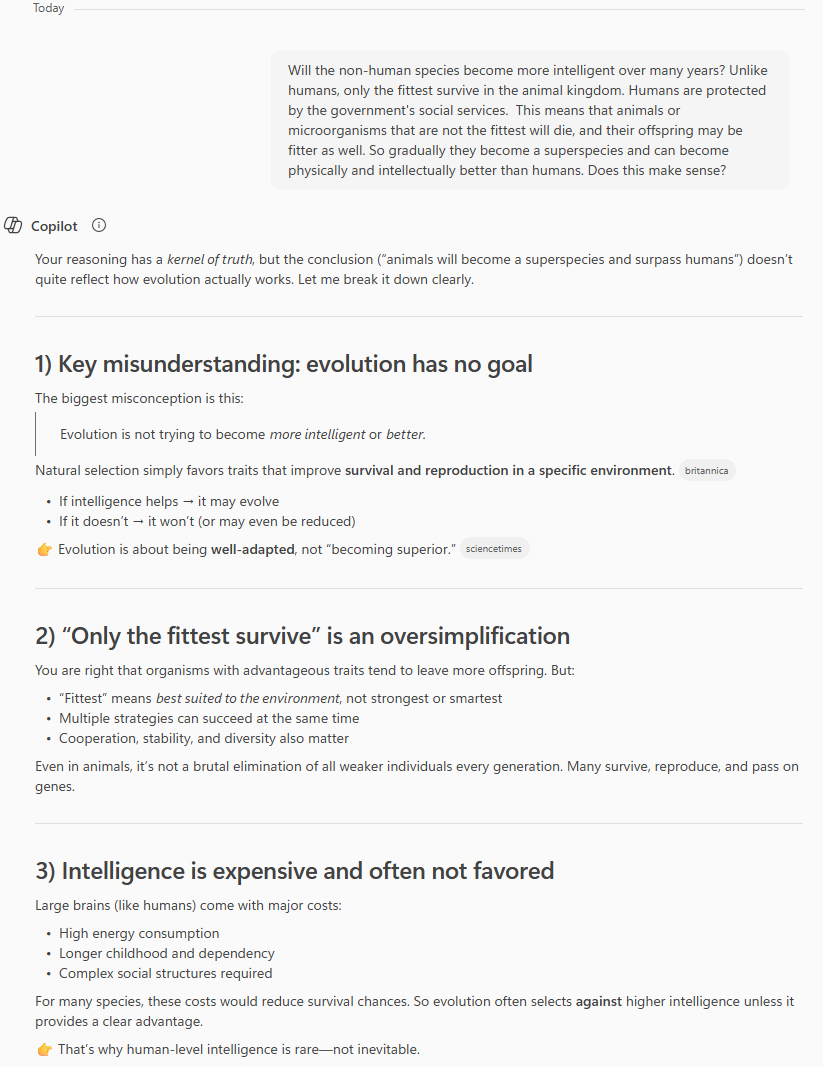
In this demo, I asked this crazy question to both locally hosted ollama and Microsoft CoPilot
The below is from my locally hosted ollama
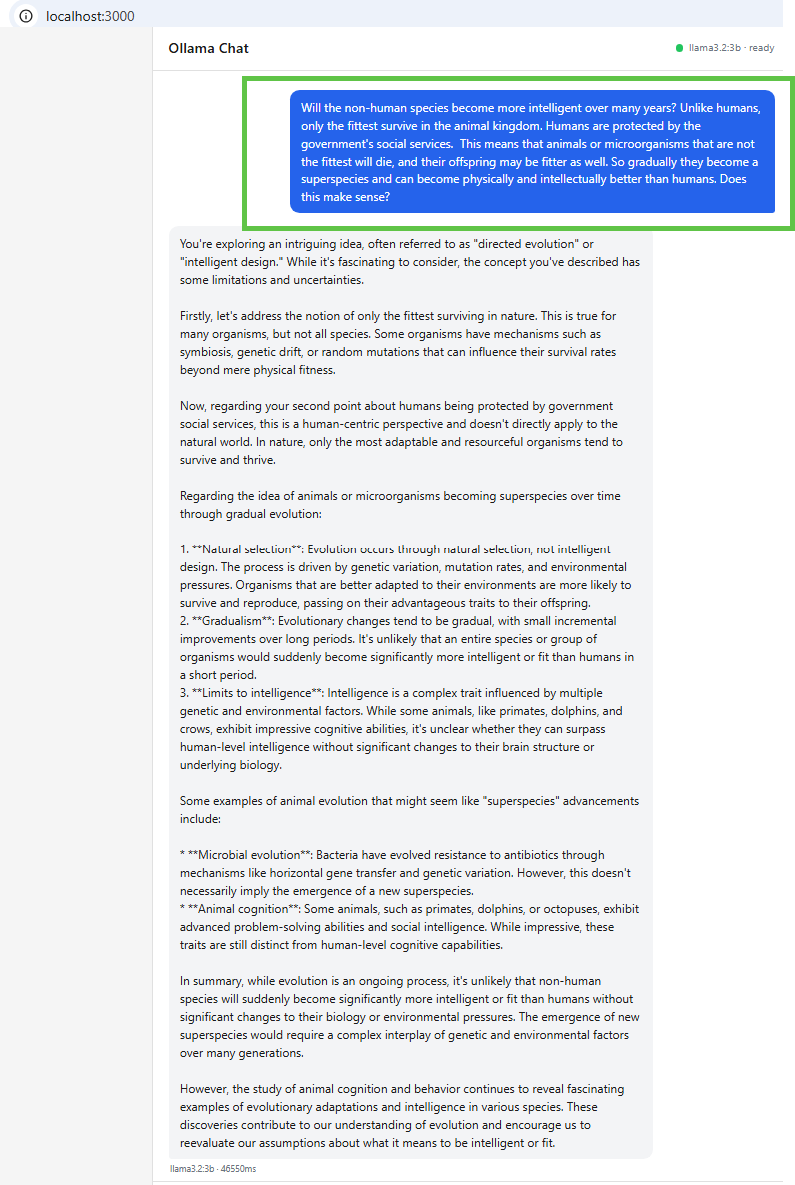
The chat tab lets you send prompts directly to the model. The health indicator in the header shows live status of the MCP and Ollama connections. If either goes down, the indicator updates and requests fail with a clear error message rather than a silent timeout.
The below was the response from Microsoft Co-pilot
What's Next
This is a spike — a working proof of concept, not production software. The obvious next steps are:
- Streaming responses — currently the UI waits for the full completion; streaming would feel much more interactive
- Conversation history — right now each prompt is stateless; persisting context would allow follow-up questions
- Structured logging — correlation IDs are assigned but not yet threaded through all log lines
- Docker packaging — containerising all three services would make deployment reproducible anywhere
For JigsawFlux, the interesting application of this architecture is in tools for field teams and health workers — where data privacy matters, connectivity is unreliable, and a locally-running model on a shared device could provide genuine decision support.
The full source is on GitHub. Contributions and feedback welcome.